
No one calls a meal excellent because the cooking is finished. No one calls a match a win because it was played. Completion and outcome are separate things, so…. Why would you call a firmware rollout “successful” just because the task is done?
Most CPE management platforms can push an image to a group of devices and report that the process is complete. Whether the devices came back healthy afterwards is a different question, and usually an unanswered one.
Our Firmware Upgrade Campaigns module was built to answer it. It validates an image on a small group, expands only as the image proves itself, and reports what happened to the devices rather than what happened to the tasks.
This article walks through the process end-to-end: scoping, test batch, gated progression, and continuous coverage and verification, as it works within AVSystem's Hybrid CPE Management Platform. If you are looking for why big-bang rollouts go wrong in the first place, that is covered separately in why firmware rollouts fail at scale.
What is a firmware upgrade campaign?
A firmware upgrade campaign is a managed firmware rollout that runs in stages, advances on measured success, and reports device-level outcomes. Instead of one bulk task applied to a device group, a campaign splits the population into batches, validates the image before the wider population is touched, and continues only while results stay above a threshold the operator defines.
What makes it different
Firmware can be moved onto devices by any general bulk-task mechanism pointed at an image file, with progress reported through installation-wide task statistics. That approach works, in the narrow sense that the files arrive. The Firmware Upgrade Campaigns module differs in five specific ways.
-
A test batch that flows into the full population. Validation is a stage of the campaign rather than a separate exercise run on the side and then repeated by hand at scale.
-
Progression gated on measured success. Batches advance when a success-rate threshold set by the operator is crossed, evaluated continuously, instead of when someone remembers to go and look.
-
Coverage that keeps working after launch. A continuous batch applies the same rules to devices that appear in the system later, so a finished rollout does not slowly come undone.
-
Upgrade-specific statistics. Failed-to-reconnect percentage, unexpected reboots and task re-executions describe the state of the devices, not the state of the tasks.
-
Optional subscriber-experience verification. With the Customer Experience Management module enabled, the same campaign can be assessed against Health Score, hardware performance and connection stability, before and after.
The process at a glance
A campaign has four moving parts: a defined scope, an optional test batch, gated batches across the population, and an optional continuous batch that keeps covering devices as they arrive. Underneath all of them sit the scheduling windows and quotas that protect the network while the rollout runs.
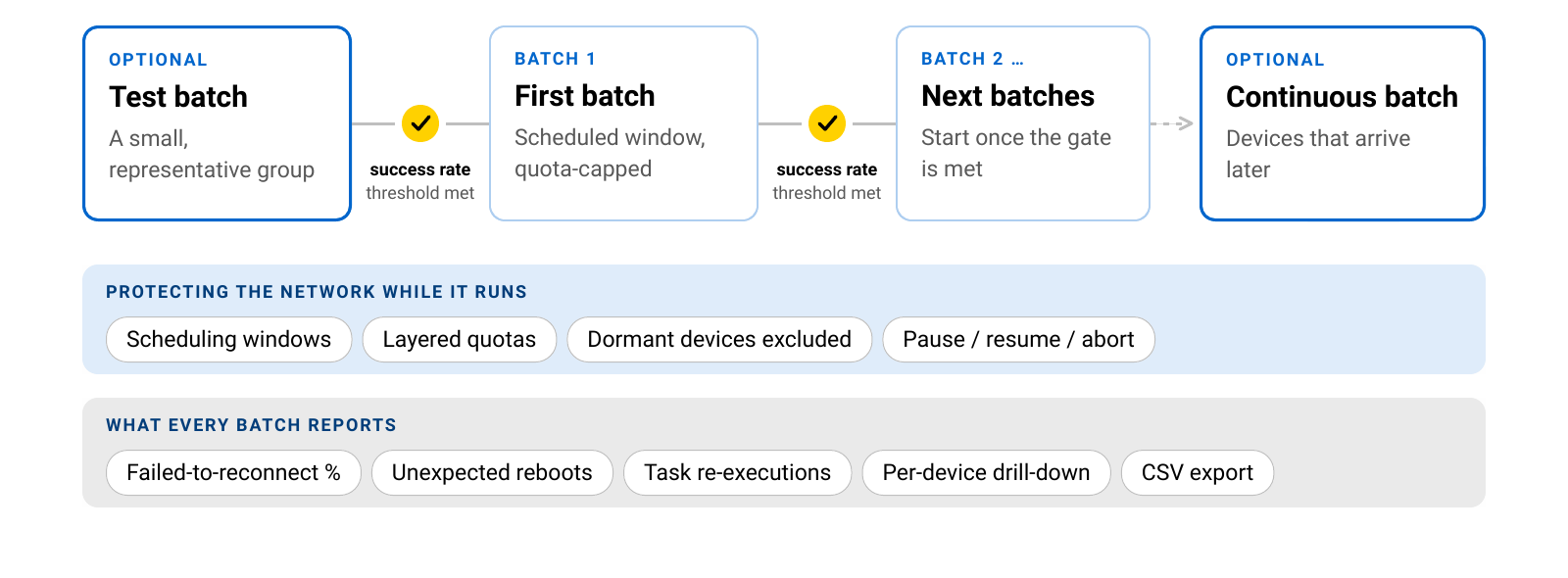 The sections below take each stage in turn.
Step 1: Scope the campaign
Every campaign starts with three decisions: which image, which devices, and which protocol.
Devices are selected through device type groups, a hierarchy of manufacturer, model, and firmware version. You describe a population instead of maintaining a list of serial numbers, which is what makes the approach work across multi-vendor estates, subject to data-model validation and image compatibility.
The scope is deliberately narrow in two ways. A campaign serves one protocol, either TR-069 (CWMP) or TR-369 (USP). It also runs from one source firmware version to one target version, so consolidating five old versions means five campaigns.
That is the extra setup, and it is the reason the rest of the process means anything. When every device in a campaign starts in the same state and is heading to the same state, a success rate describes something real. Average five different starting points together, and the number stops being something you can act on.
Step 2: Prove the image on a test batch
An optional dedicated test batch runs the upgrade on a small, representative group before the wider population is touched.
Representative is the keyword here. The goal is to include the models and conditions that actually exist in the fleet: the dominant hardware, the older revisions, the sites with marginal connectivity, rather than whatever is convenient to reach. A test batch made of five healthy devices on a lab bench proves very little.
Nothing else moves until the test batch has been reviewed. If the image misbehaves, the cost of finding out is a handful of devices, at a moment the operator chose.
Step 3: Let the success rate set the pace
This is the mechanism that separates a campaign from a scheduled bulk task.
The population is split into batches. The operator defines a success-rate threshold, and the next batch starts automatically only once the previous batch crosses it. The evaluation is live: it happens on every device status change, not on a periodic sweep.
The effect runs in both directions. A faulty image stops early, because the batch never reaches the threshold and the campaign does not proceed. A good image is not held back, because progression happens as soon as the evidence is in. Safe and fast stop being a trade-off and become the same mechanism, pointed at different outcomes.
Step 4: Keep covering devices that arrive later
A fleet is not a fixed list. Subscribers activate, devices are swapped, units come back from repair, and they arrive running whatever firmware they shipped with.
An optional continuous batch picks up devices that appear in the system after the campaign launched, so they may be upgraded under the same rules: the same scheduling windows, the same quotas, the same gating. It can be added to a campaign that is already running.
The practical difference is that closing a vulnerability stops being a one-off event and becomes a state the campaign maintains.
Step 5: Verify what actually happened
A completed task tells you a device accepted an instruction and reported back. It does not tell you whether the device is healthy.
Campaign dashboards report upgrade-specific indicators:
- Failed-to-reconnect percentage. Devices that took the upgrade and did not come back.
- Unexpected reboots. Devices restarting when they should be stable.
- Task re-executions. The same upgrade running again on the same device.
Alongside these: per-batch status distribution, per-device drill-down, and CSV export for reporting and audits.
With the Customer Experience Management module enabled, operators can also compare subscriber-experience indicators before and after the upgrade, including Health Score, hardware performance, and connection stability. That answers the question underneath all of this: did the service get better or worse?
What stays under human control
A campaign automates the mechanical work, not the judgment.
Scheduling windows keep upgrades within the hours the operator chose. Layered quotas apply at the task and domain levels, with the stricter limit winning, and they pause execution rather than overwhelming devices or the network, including across tenants in multitenant environments. Dormant devices are excluded automatically, so they do not distort the statistics. Pause, resume, and abort are available at the campaign level at any moment.
Two things are worth stating plainly. There is no automatic rollback: what a campaign guarantees is that a faulty image stops spreading, not that it can be undone on devices that already received it. And a campaign is not automated end-to-end. Batch progression, scheduling, and continuous coverage run on their own, but campaigns are finished manually, deliberately.
One workflow for a hybrid fleet
The same campaign process applies to fleets managed by the TR-069 ACS and by the TR-369 Controller, with the platform scheduling the appropriate upgrade task for each device.
For operators mid-migration to USP, this removes a familiar cost. Firmware lifecycle is one of those operational processes that would otherwise have to exist twice, in two tools, for the entire length of the transition.
FAQ
What is a firmware upgrade campaign? A firmware upgrade campaign is a managed firmware rollout that runs in stages and advances based on measured results. It validates the image on a test batch, splits the remaining population into batches that progress only when a success-rate threshold is met, and reports device-level outcomes rather than task status alone.
Can one campaign upgrade devices running several different firmware versions? No. A campaign runs from one source firmware version to one defined target version. Consolidating multiple older versions means running a separate campaign for each. That constraint is what makes a campaign's success rate meaningful, since every device in it starts from the same state.
What happens if the firmware image turns out to be faulty? The batch does not reach the success-rate threshold, so the campaign does not advance and later batches never receive the image. Operators can also pause or abort the campaign at any point. There is no automatic rollback, so recovering devices that already received the image is a separate operation.
How are devices that join the network after the rollout starts handled? An optional continuous batch picks up devices that appear in the system after launch, and they may be upgraded under the same rules as the rest of the campaign. It can be enabled on a campaign that is already running.
Does a firmware upgrade campaign work with both TR-069 and TR-369 devices? Yes, though each campaign serves one protocol. The workflow is the same for fleets managed by a TR-069 ACS and for fleets managed by a TR-369 Controller, and the platform schedules the appropriate upgrade task per device, so a hybrid estate does not need two separate firmware processes.
Do you need additional modules to see the impact on subscribers? The campaign dashboards, including failed-to-reconnect, unexpected reboots and task re-executions, are part of the Firmware Upgrade Campaigns module. Comparing subscriber-experience indicators before and after an upgrade requires the Customer Experience Management module.